Tag: College EHR

Medicat One

Upgrading to MedicatOne

Upgrading to MedicatOne:

What Campus Teams Loved (and Learned) Along the Way

Moving to a new EHR can feel like stepping into a renovation that’s still in progress. The layout looks different. Your “light switches” (aka workflows) aren’t where they used to be. And even if the new kitchen is gorgeous, not everyone is thrilled on day one.

We discussed this and more during our webinar on upgrading to MedicatOne – with candid insights from leaders at Appalachian State University, the University of North Alabama, the University of Utah, and the University of Illinois Urbana-Champaign.

If your clinic is considering the shift from our legacy software (or another EHR) to MedicatOne, here’s what you can expect to learn from this article: why campuses made the move, how they managed change, what features made an immediate difference, and what they’d do differently next time.

By the way: If you missed the live webinar, you can catch the replay below:

Why Campus Clinics Made the Move to MedicatOne

The reasons varied, but they all connected back to one goal: a smoother experience for staff and students.

Legacy limitations and IT headaches

At Appalachian State, Executive Director Beth Booth shared that persistent IT issues with the RDP environment were creating near-daily disruptions. That pressure made the decision clearer: moving to a web-based platform wasn’t just a preference; it was operationally necessary.

A unified student experience across care centers

At the University of Utah Counseling Center, Scott McAward described a different starting point: their center wasn’t using Medicat at all yet. They were coming from another EHR and went straight into MedicatOne. The driver wasn’t just technology—it was strategy. Their campus leadership wanted a more unified system across health and wellness, including a consistent portal experience for students.

Contract timing and financial practicality

At UIUC, Administrative Nurse Becca Reed explained that contract timing forced a broader EHR evaluation. After weighing options, MedicatOne emerged as the best fit, —and the team also valued their existing relationship with Medicat.

“If counseling is switching, we’re switching together!”

At the University of North Alabama, Sheena Burgreen shared how one clinic’s push for change became a cross-campus shift. Their counseling center needed a new system, like MedicatOne, and that sparked a joint decision: upgrade counseling to MedicatOne and move their student health clinic to MedicatOne through a single, coordinated effort.

Change Management: Treat It Like a Renovation, Not an Update

Nearly every panelist named the same top concern: change. Not because teams doubted the value of MedicatOne, butbecause they worried about workflow disruption, training fatigue, and uncertainty about how their workflows could be moved over to the new platform..

One of the most helpful metaphors in the webinar was this:
Moving to MedicatOne is like walking back into your house after a renovation.
It’s still your house (same database), but things have shifted. And until your team adjusts, small differences can feel bigger than they actually are.

What worked best across campuses

While each school handled change differently, these approaches came up repeatedly:

  • Build a “super user” team across clinics and roles. Beth emphasized that having representatives from each department (nursing, providers, front desk, billing) helped staff feel supported and reduced bottlenecks.
  • Start with leadership alignment, then build buy-in. Scott shared that leadership buy-in mattered early—especially when staff were entrenched in prior workflows. Interestingly, he noted staff adapted faster than leadership expected once they experienced MedicatOne’s user-friendly, web-based interface.
  • Communicate early and often—even when things are still evolving. Becca’s team went live while elements were still changing. Her biggest takeaway? Assign someone to focus on communication, so updates don’t get lost while builders are heads-down configuring the system.
  • Set expectations properly: this isn’t “just an upgrade.” Sheena and Beth both said their teams initially underestimated how much front-end build work was needed. Once they understood the upfront work necessary to get maximum value out of the upgrade, the transition felt more manageable (and worthwhile).

What Went Better Than Expected

Even with nerves about change, the panelists shared surprising wins, especially in areas that directly impacted daily workflow.

Front desk and scheduling adoption was fast

Beth noted that front desk staff picked up the scheduling and check-in process in a matter of days. For many clinics, that’s a big deal—because operational friction tends to show up first at the front door.

Staff used the transition to improve workflows

Becca shared a great example: their flu workflow in Medicat’s legacy platform was still paper-based. Moving to MedicatOne gave them the chance to digitize it with a “note favorite” that less tech-comfortable nurses could easily use. The result: smoother adoption than expected.

“It worked how you thought it should work!”

Sheena pointed out something that sounds simple but matters in high-volume clinic environments: staff found the interface intuitive. When they needed to print, attach, or send a secure message, the right action button was where they expected it to be. That reduces training time and frustration.

The MedicatOne Features Teams Love Most

Once clinics settled in, a few standout features consistently improved staff efficiency and student experience.

1. Secure messaging (especially for counseling)

Scott called secure messaging the biggest positive change. It allowed their team to eliminate most email communication with students and reduced the need to copy/paste content into charts—an immediate time saver with clear privacy benefits.

2. Posting lab results directly to the portal

Beth highlighted the ability to review and publish lab results to the portal (with control over manual vs. auto publishing). That shift reduced administrative workload and made it easier for clinicians to keep students informed of their health status without a bunch of extra steps.

3. ePrescribing workflows

Sheena shared that for their medical providers, using Rcopia (especially for medications not stocked in-clinic) was a game-changer. It streamlined prescribing workflows and improved the day-to-day provider experience.

4. Single sign-on

Becca’s team loved single sign-on, which she highlighted as a small feature with a big impact. When providers move between exam rooms and offices all day, fewer logins mean less wasted time.

5. Multiple tabs in one view

Becca also shared that providers appreciated being able to work across multiple tabs within MedicatOne. For example, providers can pull up lab results while they’re documenting a clinical note in another tab, and also have this week’s calendar pulled up. This makes documentation and administrative work quicker and easier.


Lessons Learned: Advice for Clinics Upgrading Next

If you’re preparing for a MedicatOne upgrade, the panelists shared guidance that boils down to a few practical things to consider.

1. Choose your timing carefully

Panelists repeatedly warned against going live mid-semester. Summer rollouts were strongly preferred.

2. Build your questions list early (and keep it running)

Becca recommended maintaining a weekly list of questions, so onboarding sessions stay productive and focused.

3. Clean up Legacy before you migrate

Beth’s advice: if you want to “clean house,” do it before the move. It makes building in MedicatOne easier and prevents carrying forward cluttered workflows.

4. Give your team grace—and make space for feedback

Sheena noted that staff buy-in improved when people felt they had a say. Teams were more likely to propose solutions, not just complaints, when they felt ownership of the process.

Key Takeaways

Upgrading to MedicatOne is a meaningful shift for campus clinics, not a minor update.

These clinic leaders emphasized that when teams plan for front-end build time, build strong super-user support, and select the right go-live window, MedicatOne can significantly improve day-to-day efficiency and the student experience.

If you’re considering the move, start early, ask more questions than you think you need to, and treat implementation as a chance to improve, not just replicate, your workflows.

Interested in seeing what the upgrade to MedicatOne would look like for your campus? Connect with our team.

Industry Articles

Recent Medicat News

Continue reading

Switching EHRs

Top 8 Questions On the Process of Switching EHRs

Q&A: Ask a Customer Onboarding Specialist

Switching EHRs can feel a little like moving to a new house while still hosting guests. You’re trying to keep everything running smoothly, keep people comfortable, and somehow label every box correctly. If you’re a college health clinic leader, counseling center director, or VPSA helping oversee the transition, you’re probably juggling a mix of logistics, compliance, privacy, and the big question: “How do we make this better without disrupting care?”

Below are eight of the most common questions we hear about switching to Medicat:

1. Will Medicat match our current intake workflow (forms, questionnaires, screening tools)?

In most cases, yes—and this is also a chance to make intake way smoother.

If your current process involves students filling out forms in multiple places (or staff re-entering info manually), your MedicatOne implementation is the perfect time to make improvements.

MedicatOne can support a modern intake experience with:

  • Digital forms and questionnaires
  • User-friendly documentation
  • Better routing of information to the right place (i.e. referrals, educational materials, etc.)

And the goal isn’t just to “match what you have.” It’s to improve it, so your intake process becomes faster for students and easier for staff. This workflow audit will be something you discuss with your Customer Onboarding Specialist at the beginning of the upgrade process, as we want you to find greater efficiencies in your new workflow whenever possible!

2. What data do you migrate vs. leave behind? And what cleanup do you recommend?

This is where you get to be strategic.

Most EHR transitions focus on migrating the data you truly need for:

  • Continuity of care
  • Compliance reporting
  • Operational workflows
  • Documentation needs
  • Billing needs (if applicable)

Meanwhile, items like outdated templates, duplicate note types, and “we never use this anymore” can simply be left behind.

Cleanup recommendations before a switch:

  • Retire old or duplicate note types
  • Standardize templates (especially if different staff created their own versions)
  • Remove unused forms
  • Decide what should be archived actively searchable

If your team bills insurance or manages payments, the transition is also a great time to simplify billing workflows and eliminate any unnecessary steps.

3. Do we need to put all students from our old EHR into Medicat?

Usually, no—and most campuses are relieved to hear that. Instead, many schools migrate:

  • Currently enrolled students
  • Recently active records (for continuity of care)
  • Students who may return soon (depending on institutional policy)

Older, inactive records can usually be retained via an export from your previous EHR, stored separately to meet retention requirements without cluttering your new system.

4. How do we handle students who were compliant in our old EHR, so they don’t fall out of compliance in Medicat?

This is one of the first (and most important) concerns—especially if your campus relies on immunization compliance for registration holds, housing, or clinical placements.

The goal during implementation is to carry forward each student’s compliance status, so you’re not starting from scratch. Typically, teams migrate the core immunization dates and compliance indicators, so students who were “good to go” remain so after the switch.

Medicat also supports workflows that can reduce manual review moving forward. For example, Medicat’s immunization tools and integrations can streamline verification and flag noncompliant records quickly.

Friendly tip: Before migration, run a compliance report in your current system so you have a clean benchmark to compare against once you’re live on MedicatOne.

5. How do we set up permissions between clinics or departments?

Medicat supports highly granular permissions, meaning you can control access to view records or make changes based on a user’s role and clinic.

For example:

  • Medical staff may access immunizations and student health center visit notes, but not counseling notes
  • Counseling trainees may only see their assigned clients
  • Training Supervisors can review/approve notes without opening access broadly.

6. How can we automate appointment reminders?

You have options (and students usually appreciate the nudge!).

Automated reminders can be sent through:

  • Secure messages
  • Emails
  • Texts

Why it matters: fewer no-shows, fewer last-minute schedule gaps, and less manual work for front desk staff.

Pro tip: Some campuses also add a quick “what to expect” note in reminders (especially for counseling intakes) to reduce anxiety and boost follow-through.

7. How long does onboarding take, and what training opportunities are available?

Timelines vary depending on your campus size, complexity, and what you’re migrating.

A smooth go-live depends less on “speed” and more on:

  • Well-planned (and cleaned-up) workflows
  • Role-based training opportunities
  • Clear internal ownership (who decides what, does what, and approves what)

Training is typically most successful when it’s hands-on and role-specific. A nurse needs different training than a counselor, who needs different training than the administrative staff.

Friendly reminder: Training isn’t a one-and-done event. The strongest implementations build in refreshers, quick guides, and support for “we forgot how to do that” moments during the first few weeks. That’s why Medicat hosts regular, virtual education events. Plus, our Help Center features hundreds of articles, videos, and step-by-step walkthroughs showing you exactly how to use our tools. Our Support Team is also always here to help.

8. How do we make sure we don’t disrupt care during the upgrade?

Students don’t pause their needs just because your software is changing. Here are the practical ways campuses can reduce disruption:

  • Plan go-live timing strategically (avoid peak immunization or intake seasons when possible)
  • Keep a clear cutover plan for scheduling, chart access, and communications
  • Migrate the data needed for active patients and ongoing cases first
  • Use parallel processes briefly if needed (for critical services)
  • Communicate early with campus partners (housing, athletics, academic affairs)

For counseling centers, continuity can also mean ensuring risk and safety info is easy to access in the new system—without digging. Many leaders value dashboards and centralized risk tracking for exactly this reason.

Key Takeaways

Switching EHRs is a big change—but it’s also an opportunity to simplify workflows, reduce manual work, and set up your team for better student care.

The smoothest transitions focus on the essentials: clean data, smart permissions, streamlined intake, and strong training. If you plan continuity from the start, students shouldn’t feel the switch—except in the form of a better care experience.

Have more questions or want an in-depth walkthrough of our offerings? Connect with our team.

Industry Articles

Recent Medicat News

Continue reading

EHR Features

Top 5 EHR Features Clinics Use Every Day

Insights from Nikki Ford, Customer Success Manager at Medicat

Top 5 EHR Features

Campus health and counseling centers don’t have time for “nice-to-have” tools. The best EHR features are the ones teams lean on every single day—the ones that shave minutes off documentation, reduce clicks, and help students get what they need faster.

In my work with college health clinics and counseling & wellness centers, I hear about these features constantly. They’re practical, quick to adopt, and they make a real difference in clinics that are already stretched thin.

What makes certain EHR features most useful?

Higher ed care settings are uniquely complex. In the same week, you might be handling walk-ins, acute care, immunization compliance, counseling sessions, trainee supervision, and campus outreach. That’s exactly why the EHR features teams love most aren’t flashy—they’re the ones that protect time and improve consistency.

When documentation is faster, reminders run automatically, and note selection is standardized, teams can often reclaim capacity without adding headcount. And that matters not just to clinic leaders—but also to VPSAs looking closely at student access to care, retention numbers, and student success outcomes.

Below are the top five features clinics tell me they use all the time—and why they keep coming back to them.

(1) Auto Replace: Speed up charting with fewer keystrokes

Who uses it: Providers, nurses, counselors

Auto Replace is one of those “trust me, you’ll love this” features I show teams all the time. It expands short phrases into longer text, so providers aren’t retyping the same instructions and clinical language all day. And once people start using it, it tends to spread fast—because everyone wants the shortcut once they see how smooth it works.

In a college health clinic, Auto Replace is perfect for common patient instructions, follow-up language, or frequently used clinical phrasing. In counseling and wellness centers, it’s a great fit for consistent language in routine note sections, like consent statements or common intervention wording.

Value/impact: Time saved
This is an “in the moment” win. If a clinician uses it dozens of times a day, the minutes add up quickly!

Common use examples include:

  • Standard discharge guidance
  • Common assessment phrasing
  • Frequently repeated counseling note language

(2) Note Favorites: Consistent templates that reduce errors

Who uses it: Providers, nurses, counselors

Note Favorites is what I recommend when someone tells me, “Our staff is spending too much time searching for the right template.” It gives clinicians quick access to the templates they use most, so charting stays consistent, and nobody has to guess which form they’re supposed to pull.

This is especially helpful in higher ed environments with rotating staff, per-diem coverage, or clinical trainees. I’ve worked with schools where a new part-time provider came in, opened the EHR, and immediately felt overwhelmed by choices.

Once we set up Note Favorites, it was like we cleared the clutter. The right templates were front and center, and the provider could focus on the visit—not navigating the EHR system.

Value/impact: Time saved + fewer errors
When the correct templates are easy to find, teams are less likely to select the wrong documentation type, waste precious time, or miss important components of the clinical note that are tied to billing or reporting.

(3) Notification Tool: Automated messages that reduce no-shows

Who uses it: Admin teams (often with clinic leadership support)

If a clinic asks me, “Where do we start if we want to improve the student experience?” I usually point to automation first. The Notification Tool helps teams automate appointment reminders, no-show messages, form completion reminders, and post-visit assessments, so staff aren’t manually tracking and managing follow-ups.

I worked with one campus that was constantly dealing with last-minute gaps in the schedule—especially during peak weeks. We set up reminders and a couple of simple form prompts, and within a short time, they told me the difference was noticeable. The schedule held more consistently and the front desk team wasn’t spending their day chasing down students.

Value/impact: Time saved + reduced no-shows
A reminder that prevents even a handful of missed appointments each week protects the schedule, maximizes clinicians’ time, and helps reduce wait times—especially when demand for services is high.

(4) M1 Default Note Type: The right note is easier to choose

Who uses it:  Providers, nurses, counselors

This one sounds small on paper, but in real life it removes a very common friction point: “Which note type should I use for this type of visit?” Assigning a default note type to an appointment type makes the “right” choice obvious. Plus, it speeds up the start of documentation.

One of my favorite moments with this feature was working with a training-heavy clinic. They had student clinicians rotating regularly, and supervisors kept seeing the same issue: someone would select a note type that almost matched the visit, then everything downstream got messy.

Once we configured default note types, the clinic told me the impact was immediate. New student clinicians could spot the correct note type more easily, and supervisors spent less time untangling documentation.

Value/impact: Time saved + fewer errors
When clinics standardize note selection, they see better documentation quality and consistency across providers—which positively impacts reporting and quality review outcomes.

(5) Blaster: Targeted outreach and reporting support

Who uses it: Across clinic usage

Blaster is one of those tools teams really appreciate when the pressure is on. It supports mass communication to targeted student populations and can also serve as a helpful reporting tool—especially during time-sensitive moments like immunization season, policy changes, or public health concerns.

I was working with a school recently that needed to quickly identify and communicate with a specific group of students for compliance follow-up. They didn’t have time to build lists manually, and they definitely didn’t want to bounce between systems. Using Blaster, they could narrow in on the right population and get a message out fast—without the spreadsheet scramble.

Value/impact: Time saved + reporting
For many teams, this becomes one of the most practical tools for outreach and compliance-related workflows—especially when campus health guidance changes quickly or deadlines are fast approaching.

Quick checklist: What these EHR features improve

If you’re evaluating an EHR or optimizing your current setup, these five features tend to improve:

  • Documentation speed and quality
  • Standardization across staff and trainees
  • Student attendance through automated reminders
  • Data consistency for reporting and decision making
  • Outreach to targeted populations (without manual list-building)

Key Takeaways

The best EHR features are the ones teams use daily because they remove friction from even the trickiest workflows.

Auto Replace, Note Favorites, Notification Tool, M1 Default Note Type, and Blaster help campus clinics save time, reduce errors, and improve access for students.

P.S. Want a closer look? Schedule a demo to see Medicat’s tools in action.

Industry Articles

Recent Medicat News

Continue reading

Medicat Product Advisory Council

Building With Our Clients

Building With Our Clients, Not Just for Them

How Medicat’s Advisory Councils Shape Our Product

By Amy Smith, Director of Customer Experience at Medicat

At Medicat, product decisions don’t happen in a vacuum. They happen in conversation (often lively ones) with the people who use our platform every day.

One of the most important ways we stay grounded in real-world needs is through our Product Advisory Councils. These councils are made up of Medicat clients who bring deep expertise, strong opinions, and a genuine desire to help shape the future of the platform.

Their voices don’t just inform our roadmap—they influence outcomes.

Clinical Experience Within Medicat

Our commitment to real-world workflows starts with our own team. Twenty-one percent of Medicat employees have worked in college health centers or counseling clinics.

That lived experience matters. It means that when we evaluate features, workflows, or priorities, we’re constantly asking: How would this work on a real campus, on a busy day, with real students waiting?

That internal perspective sets the foundation, but it’s only the beginning. 

Advisory Councils: A Direct Line to Campus Reality

Medicat’s Product Manager, along with several other team members, works directly with multiple Product Advisory Councils made up of real campus leaders and users.

These councils represent a wide range of institution types, sizes, and use cases, ensuring we hear from diverse voices across higher education.

Council members provide feedback on:

  • Feature ideas and enhancements
  • Product priorities
  • Workflow and usability design
  • Emerging needs and challenges on campus

Just as important, we maintain a regular, ongoing dialogue with these groups. Advisory councils aren’t a one-time focus group—they’re a continuous partnership. This consistent feedback loop allows us to validate ideas early, refine decisions along the way, and move forward with confidence. 

Beyond the Council: Every Client-Facing Conversation

We know not every client can (or wants to) participate in an advisory council. That doesn’t mean their voice matters any less.

For clients outside of these councils, Medicat’s customer-facing teams and Product Manager are just an email or phone call away. We actively encourage direct conversations, and we listen closely.

At Medicat, feedback isn’t something clients submit and then hope for the best. It’s the start of a conversation that can shape what comes next. 

From Feedback to Action

A great example of this happened last August, when we invited advisory council members to join us for a demo of an ambient listening provider.

Rather than evaluating the technology in isolation, we wanted to learn alongside our clients. We asked what excited them, what concerned them, and what we should be thinking about if we brought this capability into Medicat.

The feedback was clear, thoughtful, and overwhelmingly strong.

Because of that input, we moved quickly! We’re excited to share that this new tool, Note Agent, will be available in March.

That’s what partnership looks like: learning together, deciding together, and building together.

Key Takeaways

Higher education (and campus health in particular) is constantly evolving. Our advisory councils help us keep our finger on the pulse of those changes.

At the end of the day, our clients don’t just use Medicat. They help shape it. And we wouldn’t have it any other way.

Industry Articles

Recent Medicat News

Continue reading

Campus Health Services

What Today’s Students Expect from Campus Health Services

Campus Health Services student expectations

Nearly 9 in 10 patients (89%) say it’s important to schedule appointments anytime using digital tools, and today’s students bring that expectation straight to campus. For campus leaders, this is more than a convenience trend. It’s now a core part of how students judge whether campus health services are accessible, trustworthy, and worth using.

Below are the top features and experiences today’s students expect from college health services. Plus, learn how clinics can deliver them without adding additional work.

1) Text reminders and mobile-friendly communication

Students live on their phones. If your campus health center still relies heavily on calls and voicemails, students may delay care or no-show, simply because the process feels cumbersome.

Text reminders help in two big ways:

  • First, they reduce missed appointments by meeting students where they already are.
  • Second, they lower the burden on your front desk staff because fewer students call in “just to confirm” or to cancel. This allows your staff to focus on the more important tasks at hand.

What this can look like in a higher-ed setting:

  • Appointment reminders by text with clear instructions on how to confirm or cancel, i.e., reply with “1” to confirm or “2” to cancel
  • Pre-visit forms available for health history, consent forms, and contact preferences
  • Targeted outreach for time-sensitive needs (e.g., vaccine deadlines, lab follow-ups, referrals)

For college health clinics, text reminders can help drive attendance for immunization appointments, STI testing, follow-up visits, and vaccine clinic announcements.

2) Self-scheduling that actually works (and lives in a modern patient portal)

Students expect to book services the same way they book everything else: fast, online, and without waiting on hold. A modern patient portal is the centerpiece of that experience—especially when self-scheduling is baked in.

This is where many portals fall short: they technically exist, but they’re clunky, hard to find, or force students back into phone tag. When self-scheduling is easy and intuitive, it supports both access and clinic efficiency.

Here are a few high-impact self-scheduling features students value:

  • Real-time booking (not “request an appointment and wait”)
  • Clear visit types (e.g., “UTI symptoms,” “medication follow-up,” “same-day counseling consult”)
  • Smart guardrails that route students to the right level of care (urgent vs. routine)

Operationally, self-scheduling can reduce inbound calls, shorten scheduling time, and make it easier to fill cancellations. That means campus health services can increase throughput without compromising the student experience.

3) “Less clicking, more caring”: automation that gives time back to staff

Let’s be honest — nobody wants to feel overlooked during their appointments. And college students absolutely notice when providers are rushed, distracted by screens, or spend half of the appointment furiously typing.

That’s why clinic leaders should care about what happens behind the scenes: technology that reduces manual work, so clinicians can be fully present.

Two examples that resonate with student priorities:

1. ICM Agent: fewer manual steps for immunization compliance

Immunization compliance is one of the most manual responsibilities for college health teams. When systems automate verification, flag noncompliance, and streamline follow-up, staff spend less time reviewing documents and more time helping students navigate next steps.

For schools juggling thousands of records, the ICM Agent offers the kind of automation that can be the difference between “deadline chaos” and a calm, trackable process.

–> Learn more about ICM Agent

2. Note Agent: More Face Time, Less Documentation Time

Students want to feel heard. Ambient listening tools can reduce documentation burden, helping providers maintain eye contact and build stronger rapport. In fact, research suggests eye contact is a big deal: 95.8% of patients reported feeling comfortable when clinicians used eye contact to strengthen the relationship.

Even small reductions in workflow friction matter. Note Agent’s clean interface and fewer clicks support faster charting and smoother appointments, which improves the student experience in a way they can actually feel.

–> Learn more about Note Agent

4) A seamless experience across medical, counseling, and wellness

A seamless experience is essential for providing a positive health experience to students on your campus. When campus services feel fragmented—different portals, separate forms, repeated intake questions—students can get confused and are more likely to disengage.

This is where integrated workflows can quietly improve care:

  • Shared scheduling (so students land in the right place the first time)
  • Coordinated referrals between medical, counseling, and wellness services
  • Consistent communication and expectations across departments

For VPSAs and student affairs leaders, this is also a retention and student success issue. When access is simple, and care is coordinated, students get help earlier—before challenges escalate into academic disruption.

5) Digital convenience must come with trust and privacy

Even with online scheduling and messaging, students (and their parents) want reassurance that their information stays protected.

Any modern patient portal or messaging tool should be backed by clear privacy standards and role-based access. Additionally, it’s important to comply with healthcare and higher-ed requirements like HIPAA and FERPA.

A practical way to build trust is to communicate the “why” behind your workflows:

  • Why certain visit types require screening questions
  • Why are some appointment slots limited
  • How privacy is protected across medical and counseling records

When students understand the process, they’re more likely to use it.

How to meet these expectations without burning out your team

You don’t have to rebuild everything at once. Many campuses see quick wins by prioritizing improvements that reduce friction for both students and staff:

  • Turn on (or optimize) automated reminders for high no-show visit types
  • Make self-scheduling the default for common appointment types
  • Identify your biggest “click drains” and automate or simplify them (immunization review, repetitive documentation, intake routing)

P.S. As a Medicat customer, our support team can help with this!

Key Takeaways

Today’s students expect campus health services to feel as easy as the apps they use every day: text reminders, self-scheduling, and a modern patient portal are now baseline.

The most impactful upgrades also reduce staff workload. Moreover, through tools like Medicat’s ICM Agent and Note Agent, providers can spend more time connecting with students.

If you’re planning next steps, start with the friction points that affect both student access and staff time, then build toward a more seamless and trusted digital experience.

Want a more student-friendly health experience without adding clicks for staff? Schedule a demo with our team to explore our modern student portal experience, messaging tips, and documentation tools.

Industry Articles

Recent Medicat News

Continue reading

AI-Powered Immunization Review

AI-Powered Immunization Review With Medicat’s ICM Agent

How the AI-Powered ICM Agent Works

Immunization compliance can feel like a seasonal stress test—especially ahead of fall move-in. In a recent webinar, Ruth Patten, Director of Client Development, and Ann Wright, Director of Product, unpacked how Medicat’s new ICM Agent is designed to take a major chunk of manual verification off your plate.

We rounded up the webinar’s most important insights to help you get a better understanding of how this tool works. You can also view the full webinar replay below:

Q1: What are the biggest pain points schools face related to immunization compliance management

Even with clear requirements and frequent outreach, many teams see the same issues every semester:

  • Low student engagement: Students ignore messages or wait until the last minute.
  • Incomplete submissions: Dates without documents (or documents without the required information like DOB and physician signature).
  • Data-entry mistakes: Wrong dates or mismatched vaccines entered in the portal.
  • Non-English records: Staff must request translations or rely on online language support.
  • The summer time crunch: Reviews pile up; staffing fluctuates, and registration holds can start impacting students.

Q2: How manual is immunization verification today?

During our spring client survey, we uncovered that 93% of schools still do at least some manual verification /manual record entry.  Moreover, 30 of the schools we surveyed reported that more than half of their verification is done manually—a big signal that there are still ample opportunities for automation to make a big impact on compliance workflow.

Q3: What has Medicat already done to reduce manual work in immunization compliance?

We walked through several tools that many campuses already use:

  1. Student portal data entry + upload to shift basic data entry away from staff
  2. State immunization registry connections (automated push/pull—great when students were immunized in your state)
  3. VeriVax integration to pull records across state lines when students were immunized elsewhere

However, even with these tools, a remaining slice of records (especially in international or non-state registry scenarios) still requires a human to compare documentation against what’s entered. This is why we’ve built the ICM Agent!

Q4: So… what is the ICM Agent?

ICM Agent is Medicat’s AI-powered tool that compares dates and details entered in the system to the dates/details shown on uploaded documentation. It then marks the appropriate immunization “facts” as verified (or leaves them unverified when sufficient documentation is missing).

The goal is simple: put more of the tedious comparison work onto the Agent’s plate while keeping a human in control in case any adjustments to compliance status need to be made.

This functionality builds on Medicat’s existing Immunization Compliance tools, including the student portal, state immunization registries, and streamlined document review.

Q5: How does ICM Agent help teams day-to-day?

There are four primary benefits to using the Medicat ICM Agent:

  1. Less manual labor verifying immunization facts.
  2. Faster processing across many files at once (instead of one-by-one review)
  3. Human oversight stays in place (staff can see what AI did and override as needed)
  4. Reduced risk of human error, like missed signatures or overlookeddetails

For campus health teams, the result is smoother, more efficient workflow without sacrificing accuracy or oversight.

Q6: How will staff know what was reviewed by AI or a human?

During our webinar, we shared a set of new icon statuses inside MedicatOne ICM:

Document icons (paper icons):

  • Unprocessed (no human/AI has reviewed yet)
  • Processed by human (verified by staff)
  • Pending AI (queued for AI review)
  • Processed by AI (AI reviewed and verified what it could)
  • Failed (reserved for technical failures)

Fact icons (round dots):

  • Unverified (no supporting documentation)
  • Verified (trusted source like registry/VeriVaxor manually verified documentation)
  • Verified by AI (the “favorite icon” moment—AI found proof in the document)

Q7: What happens if the AI can’t read a file?

In cases where a file can’t be fully processed, the system handles it in one of two ways:

  • If the document is readable but contains no usable immunization data, the ICM Agent will mark the document as processed but will not verify any facts—mirroring how a human reviewer would handle the same situation.
  • If the file is technically unreadable (for example, it can’t be opened), the document is flagged as failed, and staff can prompt the student to re-upload a valid file.

Q8: Can it handle waivers and lab results?

Support for waivers and lab results is part of the ICM Agent roadmap and will be introduced in future product phases. Each phase builds on the last to expand automation and reduce both student and staff workload.

Q9: Does ICM Agent store PHI?

Medicat’s ICM Agent does not persist PHI. The comparison happens “in memory,” and only the results are saved back into your Medicat system. Additionally, security documentation (HECVAT) is available upon request. Please email info@medicat.com for more information.

Q10: How do students learn what’s missing once ICM Agent reviews their submission?

This workflow can remain automated: when immunization fact statuses change, notifications can be sent to students directing them back to the portal, where the status of satisfied versus missing requirements is clearly displayed.

Pro tip: Teams can configure custom notifications to add more explicit instructions.

Q11: Is the ICM Agent expected to cause system delays?

No. The ICM Agent operates as a separate system on different servers than our EHR platform and does not interact directly with your SQL database. As a result, it does not impact overall system performance.

Key Takeaways

ICM Agent is built to reduce the heaviest part of immunization season workload: manual document comparison at scale—without removing human control.

If your team is already using MedicatOne cohorts, the student portal, a state registry interface, and/or VeriVax, ICM Agent is designed to close the “last mile” that still forces staff to do manual review.

Interested in learning more? Get in touch with our team, or sign up for the ICM Agent waitlist!

Industry Articles

Recent Medicat News

Continue reading

AI Ambient Listening

How Ambient Listening Tools Help Campus Providers Save Time

Less Typing, More Listening

As college health and counseling teams face growing demand and not having enough time, new technology is helping providers focus more on students and less on screens. For health appointments, you have 20 minutes allotted for each visit. That’s 20 minutes to listen, diagnose, connect, and somehow document everything.

Additionally, counseling teams feel a similar squeeze. A session may be scheduled for 60 minutes, but that hour has to cover building rapport, working through concerns, and documenting progress. In reality, it often becomes 40 minutes of conversation and 20 minutes of paperwork—time that could be better spent supporting students.

So, you’re probably typing while talking, or staying late to finish notes after hours (maybe while eating lunch at your desk… again). But what if you could spend that time actually connecting with students — or finally make it to that 6 p.m. workout you’ve been missing?

There’s a better way to handle documentation — one that works quietly in the background while you focus on care. Let’s look at how ambient listening works and how it’s transforming the provider and student experience.

What Is an Ambient Listening Tool?

Think of ambient listening as your real-time documentation partner that seamlessly integrates with your EHR, like Medicat.

Using secure, permission-based AI, the tool “listens” to the natural conversation between a provider and a student during an appointment. As you focus on the student, it transcribes and structures the conversation in the background, automatically updating the clinical note in your EHR.

By the end of the session, your documentation is already organized and ready for quick review, edits, and sign-off — no extra typing, toggling, or note reconstruction required. You stay fully engaged in care; the ambient listener keeps your chart up to date, complete, and compliant.

How Does Ambient Listening Work?

Behind the scenes, ambient listening uses secure, AI-powered technology to simplify the documentation process from start to finish.

Here’s the play-by-play:

  1. Secure Audio Capture: With the student’s consent, the conversation is recorded through the ambient listening tool.
  2. Real-Time Transcription: Speech recognition technology converts spoken dialogue into accurate text as the visit unfolds.
  3. Smart Summarization: AI identifies key details — like symptoms, assessments, and recommendations — and formats them into a clear, structured draft note.
  4. Personalized Accuracy: The system learns your voice patterns over time, distinguishing you from other students in the room for even greater precision.
  5. Quick Review and Sign-Off: At the end of the visit, review, make any necessary edits, and finalize your note. Documentation is completed before you leave the room.

It’s like having a trusted scribe working quietly in the background, so that you can stay focused on care, not the keyboard!

Curious what this looks like in minutes saved? Try our Note Agent calculator to estimate how much time your team would save each week.

Why Providers Love It

Ambient listening isn’t just about saving time — it’s about giving time back.

  • More Connection, Less Distraction: Look up, listen deeply, and build trust without your keyboard stealing the spotlight.
  • Fewer After-Hours Notes: Leave the office on time, without a growing queue of unfinished notes.
  • More Accurate Documentation: Notes are generated in real-time, capturing details you might forget later.
  • Better Work-Life Balance: Enjoy that lunch break, take that yoga class, or just… rest.

With less time spent typing and more time spent connecting, care starts to feel personal again.

How It Fits Into Your Workflow

Here’s the best part: you don’t have to change how you work to benefit from it.

Ambient listening integrates directly with your existing EHR, fitting naturally into the appointments you already manage every day. For instance, Whether you’re a campus health provider documenting a student’s sore throat or a counselor capturing insights from a therapy session, the process feels familiar, just smoother and faster.

Your notes are drafted automatically, formatted for compliance, and ready for quick review before you move on to the next student. Less clicking. Less catching up. More time for meaningful care.

Privacy and Compliance You Can Count On

Privacy isn’t optional; it’s essential. The technology integrated within Medicat is built to keep student information safe, secure, and confidential.

End-to-End Encryption: Every word is encrypted from the moment it’s captured to the moment it’s stored, keeping conversations protected behind multiple layers of security.

  • Controlled Access: Only authorized users within your EHR can view or manage the transcribed notes; no outsiders, no exceptions.
  • Provider Control: You decide what gets saved, edited, or deleted before anything becomes part of the student’s record.
  • HIPAA Compliance: The solution integrated within Medicat meets the highest standards for protecting health and education data.

Key Takeaways

Ambient listening helps providers stay focused on students while keeping documentation accurate and effortless. It saves time, reduces after-hours work, and supports stronger connections during each visit. Built with privacy and security at its core, the ambient listening technology integrated within Medicat meets the highest standards for protecting student health information.

As Medicat continues to expand its AI capabilities, every feature is designed to enhance care while keeping clinicians in control. When technology supports you behind the scenes, you can focus on what matters most… your students.

P.S. Turn charting time into patient time. Explore Note Agent.

Industry Articles

Recent Medicat News

Continue reading

Clinical Documentation

How Voice Dictation Speeds Up Clinical Documentation for Campus Providers

How Voice Dictation Speeds Up Clinical Documentation for Campus Providers

Webinar Highlights: Q&A with University of Illinois Providers Katerina Rosenbeck, Nurse Practitioner, and Kaley Hennigh, Mental Health Care Manager.

Paperwork shouldn’t take longer than patient care. Yet for many college health and counseling providers, clinical documentation consumes precious hours each week—time that could be spent directly with students.

To solve this challenge, the University of Illinois at Urbana-Champaign’s McKinley Health Center began using a new voice dictation tool called FluencyDirect that integrates with Medicat’s EHR.

For providers Kate and Kaley, the change has been transformative, giving them more time for students and less time tied to documentation. Continue reading to learn from their experience.

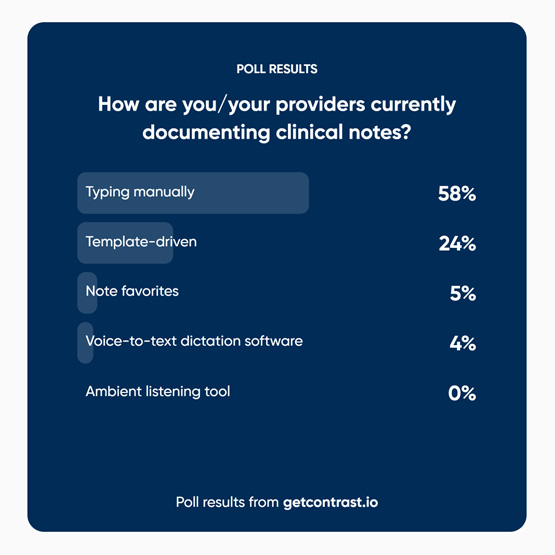
Documentation poll

Q1: Before using voice dictation, how were you documenting patient visits?

Kate: Honestly, it was mostly manual typing. That was just my default; sitting down after a session and typing everything out. I’d use templates sometimes to save time, but even with those, I felt glued to the keyboard.

Kaley: Same here. Typing was just the norm, but it wasn’t practical for mental health notes. Some of my cases are very detailed, so it could easily take me more than 15 minutes to finish a single note.

Most providers still rely on manual typing for documentation, according to our webinar poll.

Q2: After adopting voice dictation, what kind of difference did you notice in your workflow?

 Kate: The dictation tool sped up everything. Instead of clicking through boxes or typing endlessly, I can just say what I need and it gets entered. I was pleasantly surprised at how accurate it is, even with background noise. It also recognizes different accents, which is a big plus on a diverse campus like ours. For me, it cut my charting time dramatically and made the whole process feel less like a burden.

Kaley: It took a little practice at first, like any new tool, but once I got used to it, my note-taking time dropped by more than half. What used to take me 15+ minutes, I can now finish in under 5. Even for complex cases or crises, I can usually complete notes in 5 to 10 minutes.

Q3: What about working in shared spaces — does background noise interfere?

Kate: I work in a bullpen-style setup with two providers and it’s not an issue. The speech mic filters out conversations or background interruptions. Even if a nurse comes in to let me know a patient is ready, it doesn’t pick that up.

Kaley: I have my own office, so it’s quieter, but I still use the handheld mic with a stand. I just move it closer if needed. The nice part is you can control when it’s on or off, so you’re not accidentally recording things you don’t want to.

Q4: Dictation vs. Ambient Listening: What’s the Difference?

  • Dictation tools like FluencyDirect transcribe your clinical notes as you dictate them out-loud, with commands for punctuation and formatting.
  • Ambient listening tools record the entire encounter in real time (with patient consent), then auto-generate the clinical note.

Kate: I haven’t used ambient listening, but I can see the appeal. It could remove the need for saying things like ‘new paragraph’ or formatting manually. My one concern would be how it captures extra information. Students often bring up unrelated issues during a visit — like sore throat first, then suddenly knee pain. I wouldn’t want AI pulling in everything unless I decide it’s relevant to chart.

Kaley: From a mental health perspective, my concern is student trust. Some of our students — especially international students — are already cautious about platforms like Zoom because they fear being recorded. So having an AI listening tool could feel uncomfortable for them. Ultimately, I think it’s about finding the right balance and being transparent with students.

Q5: How does voice dictation fit into your daily schedules?

McKinley Health Center builds documentation time into each day—15 minutes per hour for medical providers and two 30-minute blocks for mental health staff.

Kate: I like to chart right after each patient while it’s still fresh. With dictation, those five minutes are enough, so I’m finished before the day ends.

Kaley: In our department, we have 30-minute morning and afternoon charting blocks. You can always tell who uses dictation. Their notes are wrapped up during that time, and their task lists are much shorter.

Q6: Beyond patient notes, do you use dictation for anything else?

Kate: Yes! I’ve also found it helpful for emails, letters, and project work. Basically, anywhere I’d be typing a lot, I use dictation.

Kaley: If I’m writing a letter for a student or drafting something longer in Word, I’ll use it. Once you get used to it, you realize how much time it saves beyond clinical charting.

Key Takeaways

Voice dictation has helped providers at McKinley Health Center reclaim valuable time, reduce documentation stress, and improve efficiency without compromising accuracy.

For both medical and mental health providers, it’s not just about saving time— it’s about creating space to focus on what matters most: student care.

Interested in hearing the full conversation? Watch the full webinar replay.

To get more information on how your team can implement this new tool, request a demo.

Industry Articles

Recent Medicat News

Continue reading

EHR Features

7 EHR Features Clinic Leaders Love

College health and counseling centers have a tough job: meet the complex needs of today’s students while keeping operations smooth, compliant, and efficient. The right electronic health record (EHR) system can make that job much easier — and certain features consistently stand out as game changers for campus staff.

So let’s dive into the seven EHR features that win the most love from our campus clients.

1. Automated Immunization Tools

Verifying student immunization records can be one of the most time-consuming tasks for campus health teams — especially when those records come from multiple states or healthcare providers.

With VeriVax, universities can automatically verify over 90% of student immunizations for both in-state and out-of-state students.

How it works:

  1. Students request vaccine history within VeriVax from the state(s) where they received immunizations.
  2. They receive a secure, digital version of their official immunization record.
  3. Records flow directly into Medicat’s Immunization Compliance Management system for tracking and reporting.
  4. Compliance is verified automatically — no manual review.
  5. Noncompliant records are flagged for quick follow-up.

Instead of spending 20 minutes reviewing a single student’s paperwork, a nurse can see compliance status instantly. Multiply that across hundreds of students, and the hours — and headaches saved — are immense.

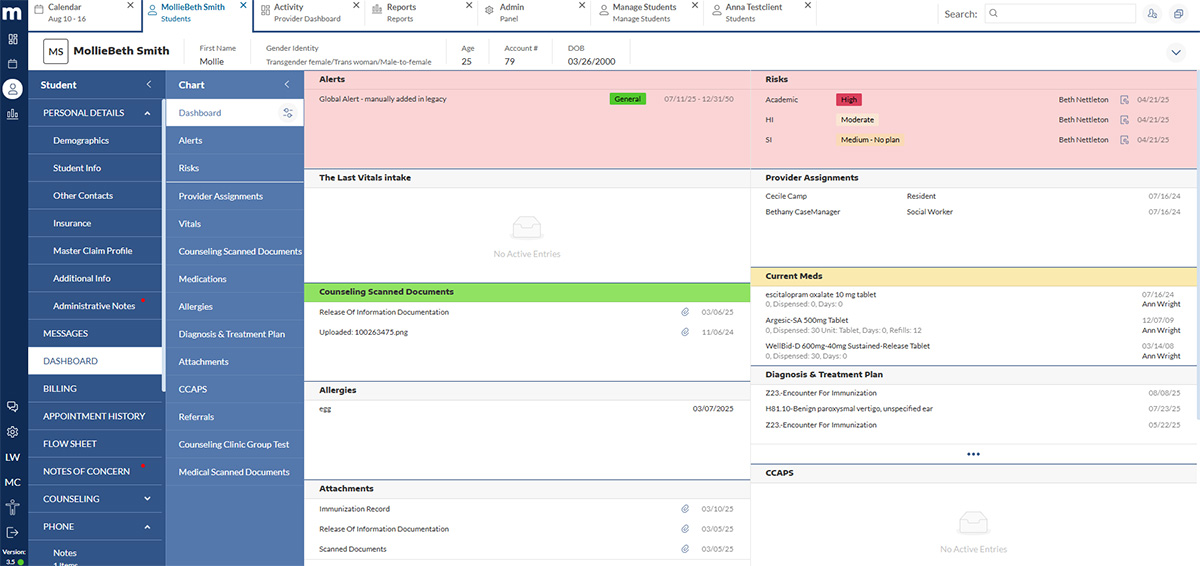
MedicatOne Dashboard

2. Dashboards That Go Beyond the Basics

MedicatOne dashboards are more than static displays — they’re active command centers for student care, providing quick access to critical information:

  • Customizable Alerts: Flag important details (e.g., medical conditions, billing reminders, cancellation policies) with start/end dates, visibility controls, and auto-dismiss or manual removal settings.
  • Risk History: View a student’s historical risk levels — academic, homicidal ideation, or suicidal ideation — with customizable categories and color codes.
  • Consolidated Attachments: See all files linked to a student’s chart in one place.
  • Hospitalization Tracking: Record admission/discharge dates, visit reasons, and status, with the option to hide details until clicked.

By consolidating insights, dashboards help staff make faster, better-informed decisions with minimal searching.

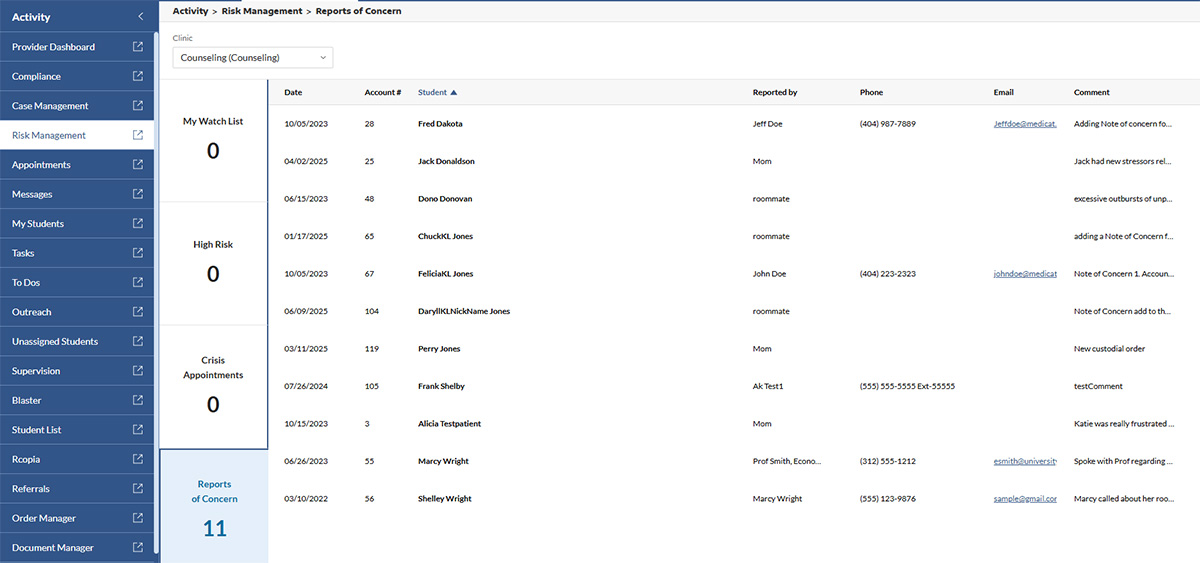
MedicatOne Risk Management

3. Centralized Risk Management

Quick access to accurate risk information can be life-saving. The Risk Management Tab stores all historical and current risk data — including notes, dates, and any changes over time.

Risks can be categorized as:

  • Academic
  • Homicidal Ideation
  • Suicidal Ideation

With default levels of:

  • Low
  • Moderate
  • High

Custom categories and color-coding allow for even more precision — for example, “Low – no intent, no plan, no history.”

Suppose a drop-in student presents to a counselor who’s never met them. In that case, the counselor can instantly see that two weeks ago they were assessed at “Moderate – suicidal ideation with prior history,” along with notes from that assessment — helping prioritize safety and coordinate follow-up.

4. A Modern, Intuitive Interface

In a busy campus setting, technology should speed up care, not slow it down. The MedicatOne (M1) interface is designed to be clean, organized, and easy to navigate, so staff can find what they need without unnecessary clicks.

A modern design isn’t just about aesthetics. It shortens onboarding time, reduces errors, and frees providers to focus on students.

Instead of toggling between multiple screens to locate a student’s notes, immunization status, and care plan, providers can access everything in just a few clicks, ensuring smoother appointments and better continuity of care.

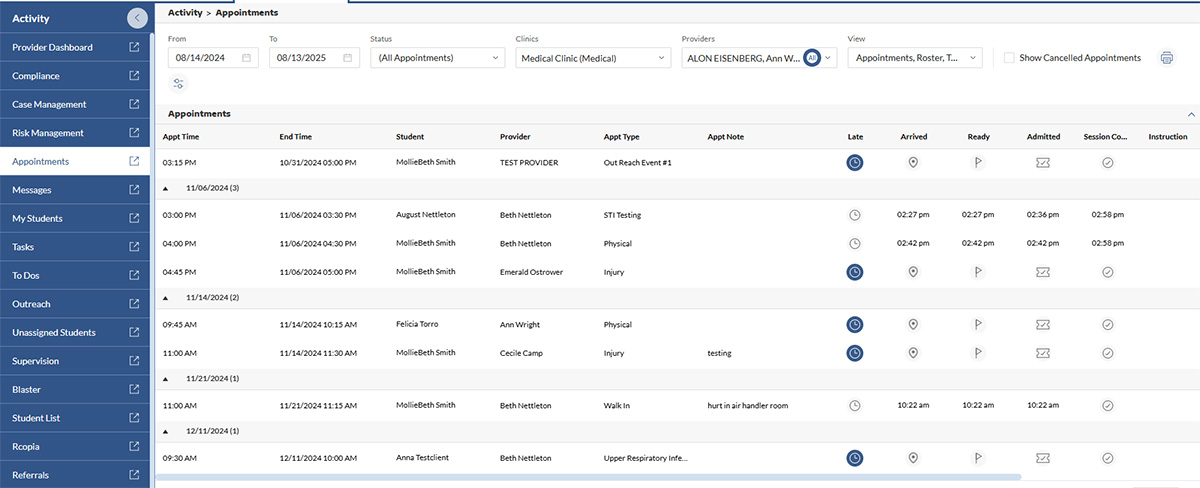
MedicatOne Appointments

5. Appointment Lists at a Glance

Not every provider prefers a traditional calendar. The Appointments Tab offers a simple, scrollable list of upcoming appointments for the day, week, or month.

For example, a counselor can start their day by scanning the list, spotting that their third appointment is a follow-up risk assessment, and reviewing the student’s chart beforehand — saving time and preventing missed details.

6. Supervision & Training Tracking

Managing interns and trainees takes more than tracking hours — it’s about supporting development and staying organized. MedicatOne’s Supervision & Training module includes:

  • Supervisor Dashboard: A live snapshot of supervisee tasks, assigned clients, and open notes.
  • Training Dashboard: Track hours, store contracts and consents, and document supervision meetings.
  • Granular Permissions: Give appropriate access to additional supervisors while keeping sensitive records protected.
  • Feedback & Sign-Offs: Route notes for supervisor review and approval to streamline oversight.

These tools help supervisors stay connected to supervise progress while maintaining complete, compliant records.

7. Granular Permissions for Better Privacy

With granular permissions, administrators can control exactly who can view, edit, or share certain data.

A nurse might have access to a student’s immunization records but not counseling notes, while a counseling intern can see only their assigned clients. This precision supports HIPAA, FERPA, and internal policies while ensuring staff have the access they need — and nothing more.

Key Takeaways

Each of these features speaks of a shared priority: more time with students, less time wrestling with technology. From automated immunization compliance to risk management and supervision tools, MedicatOne helps campus health and counseling teams work more efficiently, stay compliant, and deliver better care.

Interested in learning more? Explore our Product Gallery to see some of these tools in action!

Industry Articles

Recent Medicat News

Continue reading

College Health Clinic Efficiency

3 Key Features to Save Time and Improve Care in Your College Health Clinic

Key Findings and Their Impact on College Mental Health

You became a campus healthcare provider to heal, counsel, and support students through their most vulnerable moments. Instead, you’re drowning in documentation, clicking through endless screens, and racing against the clock to squeeze in actual patient care between administrative tasks.

You’re not alone, and you’re not imagining the burden. Research reveals that primary care physicians spend nearly 50% of their time buried in EHR systems and paperwork—almost double the 27% they spend caring for patients.

That imbalance takes a toll—not just on clinicians, but on overall clinic performance. But with the right tools in place, it’s possible to reclaim that time and refocus on student care.

In this article, we highlight three powerful features that can dramatically reduce admin time and help your staff refocus on what matters most: your students.

1. Smart Calendar Syncing for Seamless Scheduling

Juggling schedules between providers, counselors, and especially departments can be a logistical headache. Double-bookings, miscommunications, and the need to check multiple platforms (email, personal calendars, sticky notes) can significantly slow down the process.

With smart calendar syncing, providers can integrate their EHR with existing tools, like Google Calendar, Microsoft Outlook, or Apple Calendar.

Benefits of utilizing calendar syncing:

  • Instant reflection of schedule changes across platforms
  • Elimination of overbooking, no-show risks, and human error
  • Streamlined cross-team coordination without the back-and-forth

For campus health clinics that offer both medical and behavioral health services, calendar syncing also helps align staff across departments while maintaining the appropriate boundaries and permissions for privacy and access.

2. Built-In Dictation to Speed Up Documentation

Documentation is a vital part of every student encounter, but it doesn’t have to lead to working overtime. Manually typing SOAP notes or intake summaries eats up provider time that could be spent directly with students.

That’s where built-in dictation tools come in. Modern voice recognition tools allows providers to speak notes in real-time.

These tools can:

  • Accurately transcribe spoken words into structured notes
  • Cut down on redundant typing, formatting, and late-night charting
  • Improve a provider’s ability to focus on the patient

In fact, one study found that providers using speech recognition software completed documentation in just over 5 minutes per form—nearly cutting their time in half compared to manual typing.

And for multitasking providers who split time between appointments, monthly clinics, and drop-in visits, that time saved is invaluable.

P.S. Schedule time with our team to see our new dictation tool in action!

3. Streamline Intake & Care with Smart Automations

Let’s face it: no one enjoys handing out clipboards, scanning PDFs, or calling no-show students. And yet, these administrative tasks take up large portions of staff time every day.

However, with a modern EHR system, clinics can leverage digital intake forms and automated appointment reminders to take the manual work off your plate.

Look for these key features when selecting an EHR:

  • Customizable pre-visit forms sent automatically via email or secure message
  • Digital signature capture for consent and compliance documentation
  • Automated appointment reminders that cut down on no-shows and late arrivals can be sent via email, secure message, or SMS

With automation in place, the connection between communication and care becomes faster, clearer, and more reliable.

Key Takeaways

Choosing an EHR with time-saving tools like calendar syncing, voice dictation, and digital forms can transform your clinic’s daily operations. These features reduce burnout, streamline care delivery, and free up your team to focus on what matters most.

Want to see how Medicat’s campus EHR helps clinics like yours save hours each week? Schedule a demo with our team

Industry Articles

Recent Medicat News

Continue reading